Why workflows will change your team’s email habits

Why workflows will change your team’s email habits

Helpmonks just became even more useful with the new Workfow feature. With workflows you can manage the flow of your team’s email even better.

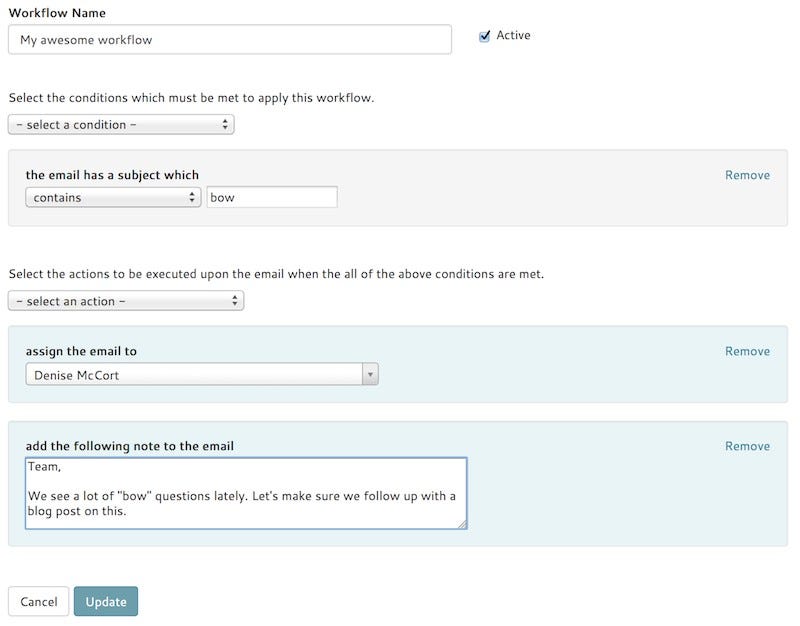
Let us take the example from our working example. Harry wants to automatically assign emails with a subject containing “bow” to Denise McCort, and add a note to them as well.

Using a workflow all Harry needs to do is to select the condition “the email has the subject” and then the actions “assign user”

Why workflows will change your team’s email habits

Helpmonks just became even more useful with the new Workfow feature. With workflows you can manage the flow of your team’s email even better.

Let us take the example from our working example. Harry wants to automatically assign emails with a subject containing “bow” to Denise McCort, and add a note to them as well.

Using a workflow all Harry needs to do is to select the condition “the email has the subject” and then the actions “assign user”

How Helpmonks plugins make your team happy

Recently we noticed many of our competitors and partners are talking about email management, and how their email solutions integrate with their client’s workflows. However, at Helpmonks we believe that dictating the user’s workflow is inflexible and forces the user to change an established workflow within an organization in order to work to an email management solution.

We believe that an application, should help you to do your work better and not burden you with additional steps. Especially,

Schedule Emails

We are very excited to announce that “Reminders” — one of my favourite feature — is now available in Helpmonks.

Add a reminder to an email and don’t lose track of important conversations. Reminders are an excellent tool for a cleaner inbox for you and your team.

Setting a reminder is straight forward. Simply select an email and choose one of the available reminder times or set your own date and time. On the reminders date and time, Helpmonks will return

Your workflow just got powered up

We are extremely excited to bring another great update to our Helpmonks platform. This time to the already powerful workflow’s to handle your team email flow.

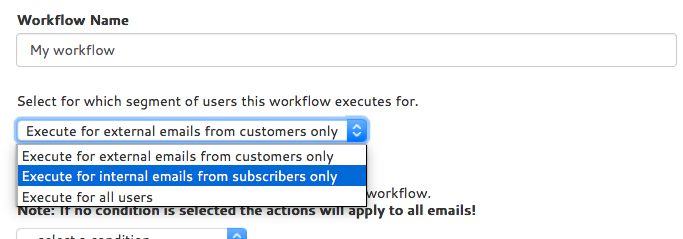
As of immediately, you can apply any workflow to any email, independent of the source of the email. Previously, workflow’s only applied to emails from customers. Now, you have the option to apply your workflow to customers only (just like before), to emails from subscribers only or to all emails.

As an

New option: default status for replies

I’m excited to announce that we just added a new option for each mailbox, that is, we now have a “default status” that is automatically set when you reply to a conversation.

The new option can be found under the mailbox settings and is called “Default Status”. Setting this to either “inbox”, “archived” or “closed” will mark the conversation with the selected status when you or a team member replies.

If you receive another reply from the customer, the

Razuna DAM Walkthrough — every Tuesday

As you may have already noticed, we run a free webinar every Tuesday at 11 am EST. All Razuna users as well as prospective customers can sign up and join for free. These webinars are used to show how Razuna DAM works to new users as well as to answer questions to existing users, who may have more complex challenges. You can sign up here: Razuna Digital Asset Management webinar

For some customers, we also conduct customer specific training sessions,