A word on your privacy and security at Helpmonks

Recently, we’ve been hearing more about data breaches and also of companies not taking enough care of their customer data. Maybe even more upsetting is that there are even businesses that make it a habit of scanning your data (emails, documents, and so forth) and selling your information.

It is abandonedly clear that those businesses do not have the customer in mind and operate to achieve short-term gains.

We, at Helpmonks, are disgusted by such business practices. Each

New in Helpmonks: Open Tracking

We are excited to announce a feature that many of our customers have asked for — the possibility to see when a recipient has opened your email, a.k.a open tracking.

Helpmonks — Tracking

With Open Tracking enabled, you will see in the list view and also in the conversation view when your recipient has opened the email to read. The tracking info is being displayed next to the “eye” icon with the time the recipient viewed your message.

Additionally, and

New in Helpmonks: More options when you reply or compose a new message

We’ve been very busy lately here at Helpmonks and I’m happy to announce a few new features today.

Action after a reply
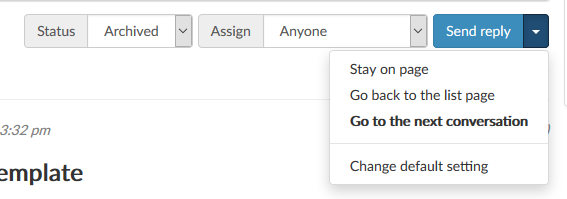
The option to either “stay in the current conversation, “jump back to the list” or “go to the next conversation” has been one of the most requested features. As of immediately, this option is now available to all Helpmonks users.

Actions after replying in Helpmonks

Quickly compose another message
Sometimes you need to send more than

New in Helpmonks: Mark messages as answered/unanswered

As Helpmonks is a system to collaborate on team email conversations the “read” and “unread” behavior is a bit different from your email client.

It doesn’t help if Helpmonks would mark messages as “read” when your team members need to see those emails as well. That’s why the “read” and “unread” behavior works as such that the email conversation becomes “read” when the conversation received a reply from your team.

However, there are circumstances where an email conversation

New in Helpmonks: Color your mailboxes

The benefit of a system like Helpmonks is that you and your team have full transparency over all incoming email conversations, including a 360-degree insight into the customers’ past and current interactions with the company, be it in the sales, support or customer service department.

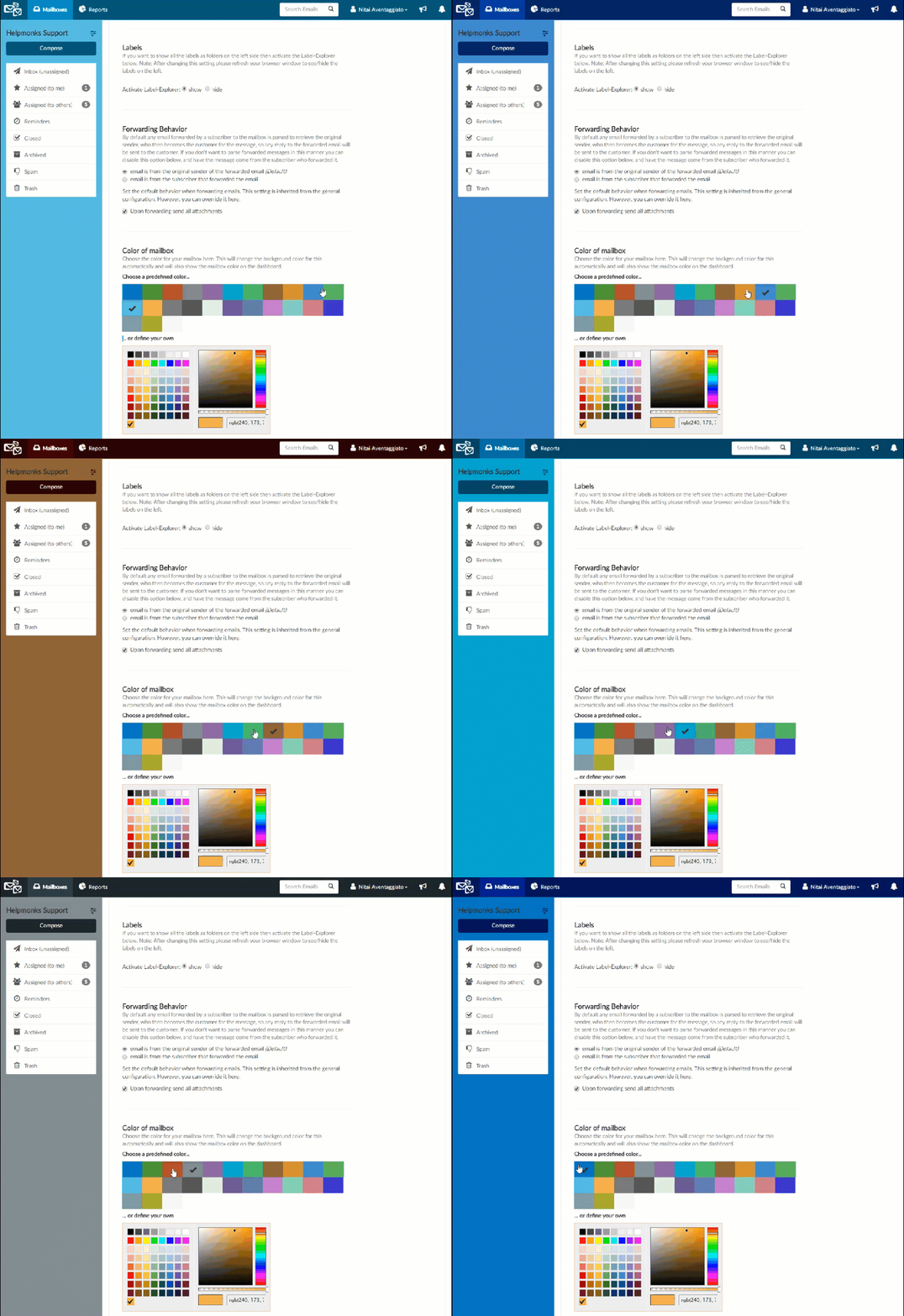
However, if you have more than five mailboxes under your control it sometimes can be challenging to differentiate them quickly. Now, with the option to color your current mailbox is done with ease.

Helpmonks

New in Helpmonks: New dashboard

We’ve been working hard the last few weeks to re-design the Helpmonks dashboard. As the dashboard is the first thing you see when you sign in to Helpmonks, we wanted to make it easy for you to know what happening in your mailboxes and at the same time making it easier to navigate and switch between your mailboxes.

Additionally, as many of you now have more than ten mailboxes we wanted to provide you with an option to

Activity stream and notification panel

It’s been a while since we’ve had a chance to write on here. We’ve been working hard to build the next great destination for email collaboration. The surge of new customers in the last few months is proof that we are on the right track.

Behind the scenes, we’ve been working on a brand new email system, both for incoming and outgoing emails. Additionally, we’ve made many enhancements and updates to Helpmonks. In the coming

The issue with the XPS13 (back then) was that it maxed out at 8GB of memory (the new ones can be…

The issue with the XPS13 (back then) was that it maxed out at 8GB of memory (the new ones can be staffed out with 16GB ram). Another issue is the very bad Wifi reception (I switched the Wifi card with an intel one but still got bad reception).

Together with a keyboard and the lack of ports, I just felt it was time for another machine. As mentioned, I’ve gotten the Thinkpad T460s and couldn’t be happier. Actually,