Email is killing your team. Here’s how to save it.

Email is killing your team. Here’s how to save it.

Raise your hand if you hate email. Keep your hand raised if you hate work email. Now keep your hand raised if you have ever managed a shared inbox or a team with a shared inbox. Now keep your hand raised if you or your team have wasted precious work hours discussing which emails have been answered, who’s going to handle which email, if the contact was ever logged in your CRM, etc.

While this is just on our

New in Helpmonks — October 2017

New in Helpmonks — October 2017

The last few weeks have been busy here at Helpmonks. We all gathered for a team meeting in Germany, spent a great time together and also managed to release many new options to enhance your productivity in Helpmonks.

Here are some of the highlights:

Sort
Sorting is now available in all list views. You can now sort by all available columns, e.g., the sender, subject, assignee, and more.

Helpmonks sorting

Labels show counts too
We finally indicate the number

Four signs you need an email management system

Four signs you need an email management system

Imagine this: It’s Monday morning and you’re pulling into the office, refreshed and raring to go. After grabbing some coffee and chatting with coworkers about how awesome your weekend was, you plunk down at your desk, fire up your email, the shared sales email, and your internal team chat. As all three load up, you’re thinking about how you’re ready to crush this week’s sales goals like an empty beer can on a college football

Announcing new reports in Helpmonks

Announcing new reports in Helpmonks

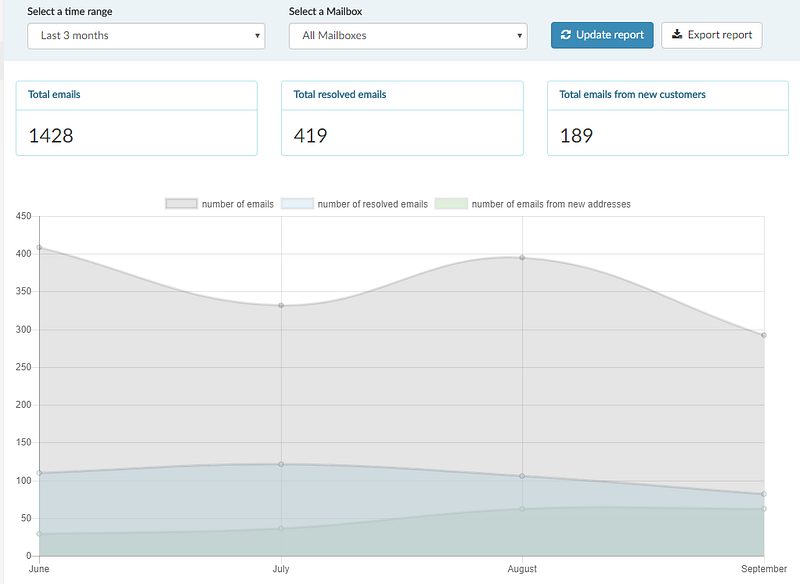
As Helpmonks continues to grow, we continue to improve the product weekly (check out our public RoadMap). Today, we are excited to announce the availability of new reports in Helpmonks.

More insight and a brand new user detailed report

All reports now feature a convenient summary on top to show you quickly the most important figures like “Total emails”, “Total resolved emails”, “Total emails from new customers”, and more.

Detailed user reporting

One of the goals of the new

Get your likes going

Get your likes going

We are happy to let you know that we are now active on Facebook and Instagram.

Join us now on Facebook and stay up-to-date with the latest development about Helpmonks — your favorite team email collaboration platform.

You can also find us on Instagram under @helpmonks where we will post more screenshots of new features and what we are working on.

We welcome you to post your comments, requests & questions.

New in Helpmonks: Merge and link conversations

Good news. You can now merge conversations in Helpmonks. Also, there is an option to link to other email conversations. With merging and linking you now have a powerful tool to combine email messages over different threads. Even with messages in other mailboxes.

Merge conversations

Merging conversations is easy. You can either merge a conversation by clicking on one of the recent conversations in the sidebar. When you click on a recent conversation, a new popup window will give you

MySQL: Specified key was too long; max key length is 767 bytes

I just ran into this issue while setting up a new client server with MySQL 5.6, well, Percona 5.6 in my case.

It looks like one has to explicitly allow long prefixes in 5.6. Something that was never needed in 5.5 or earlier version of MySQL.

In any case, adding:

innodb_large_prefix = on

to the my.cfn file solved it.

Hope it helps someone else out there :)

Filter emails by an assignee

Many of our customers have been asking for this, and we are happy to make this feature now available — the option to filter emails by an assignee.

The option to filter by an assignee is available when you go to the “Assigned (to others)” folder. You then see in the upper right corner of your emails a drop-down menu that lets you filter the list by the assignee.

Helpmonks — filter by an assignee

Next up
We are nearly