New in Helpmonks: Upload multiple attachments

New in Helpmonks: Upload multiple attachments

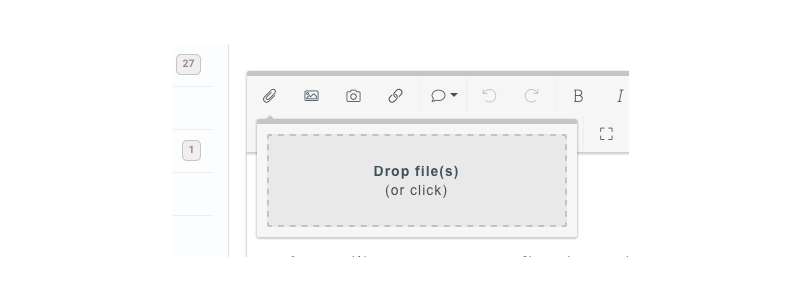
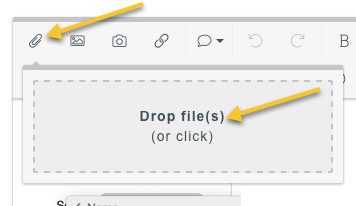
While this might not rock your boat as far as a new feature goes, it’s one of those enhancements that make you more productive — you can now upload multiple attachments at once.

We did not change the way you work with Helpmonks and how you upload attachments, but instead of being able to upload only one file at a time you can now select multiple files and add them to your conversations.

Helpmonks — multiple attachments upload

Next up

While

Helpmonks Release Notes May 2019

Helpmonks Release Notes May 2019

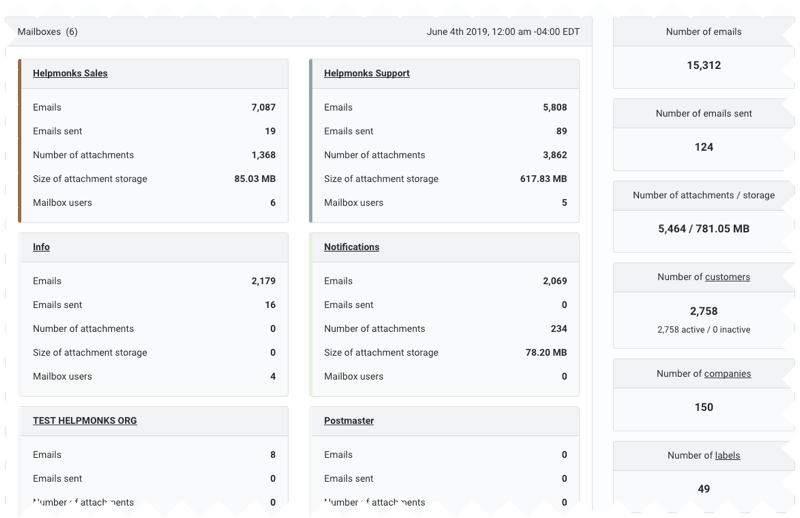
The month of May marked the arrival of some significant enhancements to Helpmonks — shared drafts, preview icons for attachments, including a new attachment view and an enhanced PDF viewer, a brand new usage report, and performance improvement across the board.

Shared Drafts

As of immediately, you have the option to share your drafts with your team members. You can do this, whenever you compose a new message or a reply. Just toggle “share draft” and your draft is automatically shared

More power for your Helpmonks dashboard

More power for your Helpmonks dashboard

When we introduced the new dashboard in Helpmonks many of you liked the concept of being able to see everything at once. This update takes the dashboard even further.

Enhanced email panel options

At the heart of the dashboard are the two panels that show you emails that are assigned to you and in the other panel emails that are assigned to others.

While this is still the core functionality, we’ve added now all statuses to the “assigned

A big update for Helpmonks: a new Dashboard and a unified view

A big update for Helpmonks: a new Dashboard and a unified view

Our mission here at Helpmonks is to help our customers to get their email workflow done most efficiently. To that end, we are very excited to introduce a brand new Dashboard today that lets you see all your emails from across all your mailboxes in a unified view. Furthermore, you now have a board that shows all emails that are assigned to your team members.

Moreover, you now have the option to customize your dashboard. Don’t want to see

New in Helpmonks: A convenient short URL for your email conversations

New in Helpmonks: A convenient short URL for your email conversations

As 2018 winds down, and the Helpmonks team has some more time to finish up new features, we wanted to let you know that there is now a convenient short URL available for your email conversations in your Helpmonks shared inbox.

You can access the short link by clicking on the new “share URL” icon at the top of the conversation. Doing so will reveal a small window with the short URL which you can copy and share with your

New in Helpmonks: More insight into your conversations and user performance

New in Helpmonks: More insight into your conversations and user performance

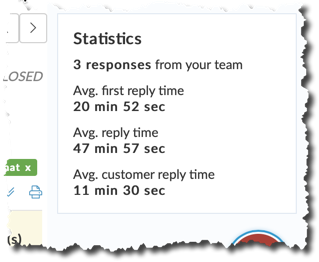
Having conversations over email is one of the most common forms how people from all nations communicate with each other. For companies of all kinds, an email is an essential tool to sell their services and products or to support their customers.

Here at Helpmonks, the collaboration email platform of choice for over 2000 organizations, we think a lot about how we can help our customers to work more efficiently with their email communication in our shared inboxes. To that

New in Helpmonks: Companies are automatically created for you

New in Helpmonks: Companies are automatically created for you

Companies — a unique feature of Helpmonks — is one of the favorite features of our customers. With companies, you have a complete overview of all the users of a company with its entire email history.

The options to create companies in Helpmonks is one of those features that helps you get more insight into how you and your team performs.

Furthermore, you can use a company record all over your shared inboxes, and they prove especially helpful when creating a workflow.

New in Helpmonks: Remove customer records

New in Helpmonks: Remove customer records

Helpmonks’s customer records is a central place where we store the record of each customer that emails any of your shared mailboxes. From here you can add the customer to a company or see the history of the customer.

Since Helpmonks first launched, the customer records could never be removed. The reason for this is that we use the customer records for historical purposes in reports. That’s great, but many of you have asked for an option to